bitbox USB-C Not Detected
If your device (iOS, iPadOS, macOS, or cameras like the Sony FX6) does not recognize your bitbox as an Ethernet device, the ethernet controller is likely in the wrong mode.
tip
For more information about bitbox USB-C functions and modes, please review the USB-C Functions article.
USB Modes
The bitbox has two USB-C modes controlled by an internal switch:
| Mode | Protocol | Compatible Devices |
|---|---|---|
| X-Mode | CDC-NCM | Embedded devices: Sony FX6, Sony FX3/FX30, GoPro |
| A-Mode | RNDIS/ECM | macOS, Windows, Linux, iPadOS, iOS, Android |
Required Tools
- 1.5mm hex driver
- Spudger
Steps
- Power down bitbox.
- Remove the back plate of the bitbox, there are 4 M2.5 screws which hold it on.
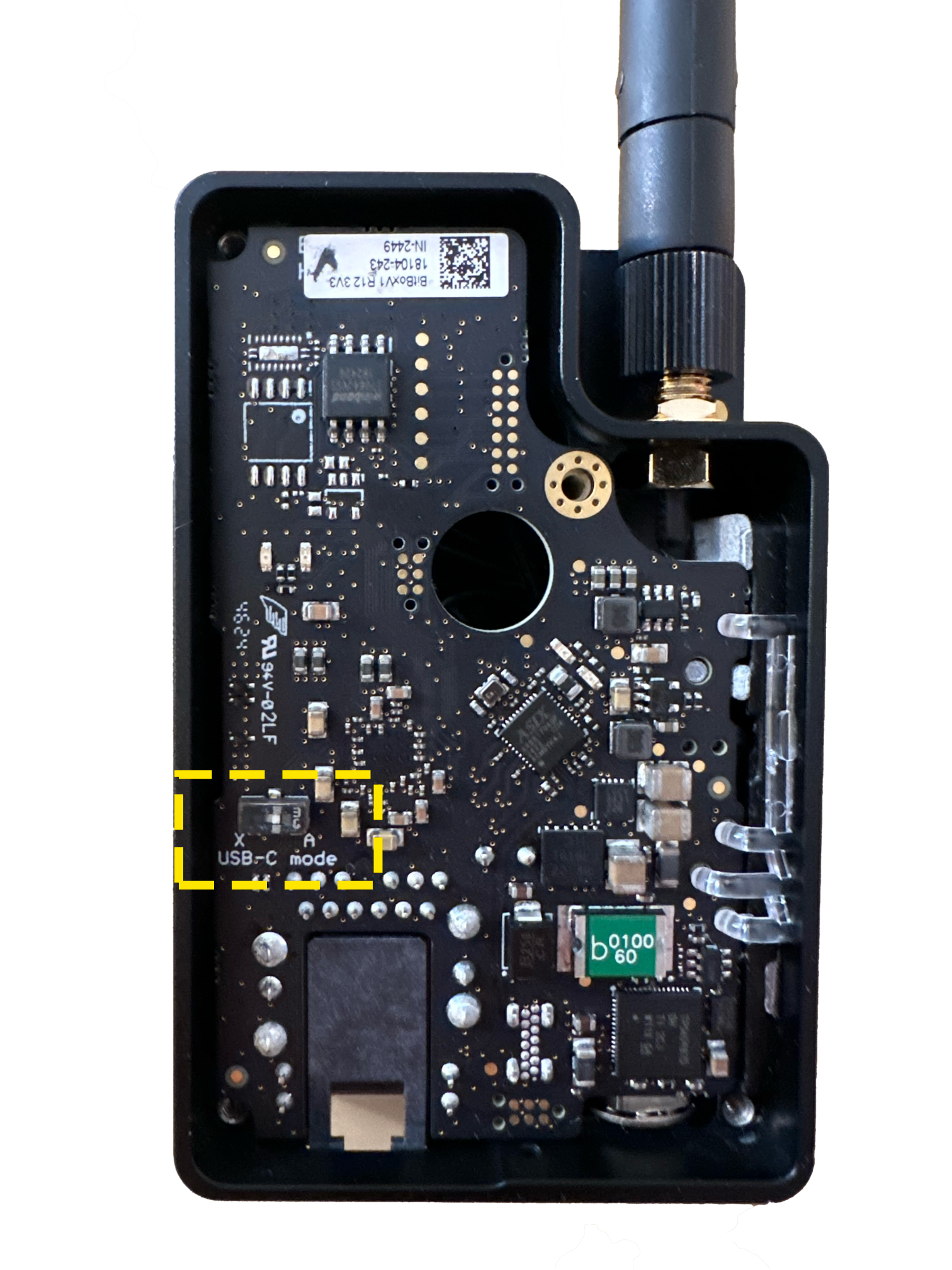
- Locate the USB-Mode switch as in the photo below.
- Flip the switch to the appropriate mode for your device (see table above).
Driver Downloads
Most devices support bitbox natively without additional drivers. If your device requires a driver, download from the official ASIX website: